Sell at the door (box office)
Record cash, card or bank-transfer sales and free comps yourself, with no booking fee.
The box office records an order you took yourself: cash at the door, a card on your own reader, a bank transfer, or a free comp. There's no booking fee, because One Ticket didn't process the payment.
Add an order
- Choose Box office in the menu on the left.
- Choose the Event. It must be published.
- Use + and − to choose the tickets. Each ticket type shows how many are left.
- Type the buyer's Name.
- Optionally type their Email. Leave Email the tickets and QR codes ticked to send them; without an email, the codes are shown on screen to hand over or print.
- Choose How it was paid: Complimentary, Cash, Card at the door, Bank transfer or Other.
- Check the Amount taken. It defaults to the ticket price; change it if they paid something else.
- Optionally add a Note. It shows in the CSV export.
- Choose Take $X (or Add order for a comp).
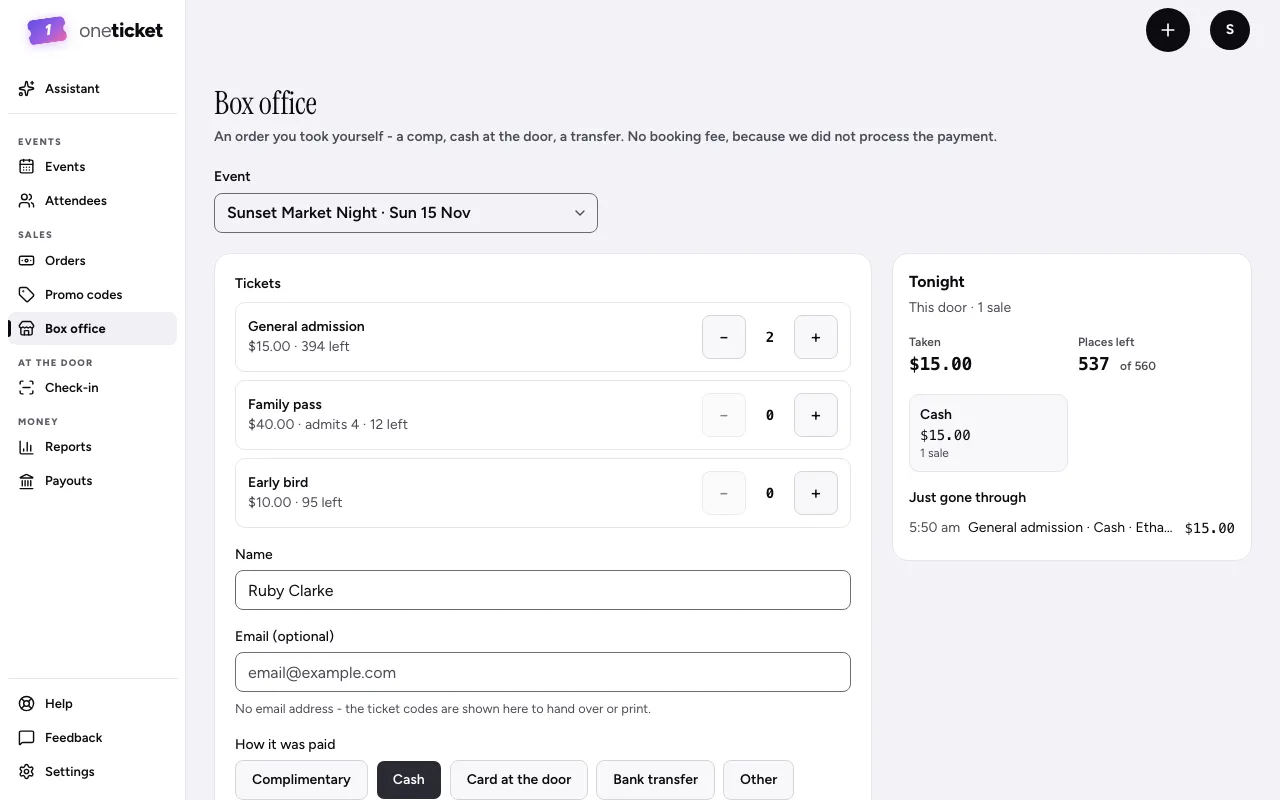
The tickets are issued straight away. They're in Orders, and their codes scan at the door. Choose Copy codes to copy them, or Add another for the next person.
Tonight
Beside the form, Tonight shows this door's sales, what's been taken and the places left, and who's just gone through.
Good to know
- Door sales are reported separately from your online sales.
- A sale at the door always goes through, even past your daily ticket limit.
- Up to 50 tickets in one order.
Still stuck? Contact support and a person will get back to you.