Repeating events and series
Run a class, a club night or a market every week: one series, a session for each date.
An event that repeats becomes a series: one session for each date, each sold and checked in as an event of its own. The series has one page listing every session.
Make a repeating event
- Choose New event and fill in the name, place, about line and tickets as usual.
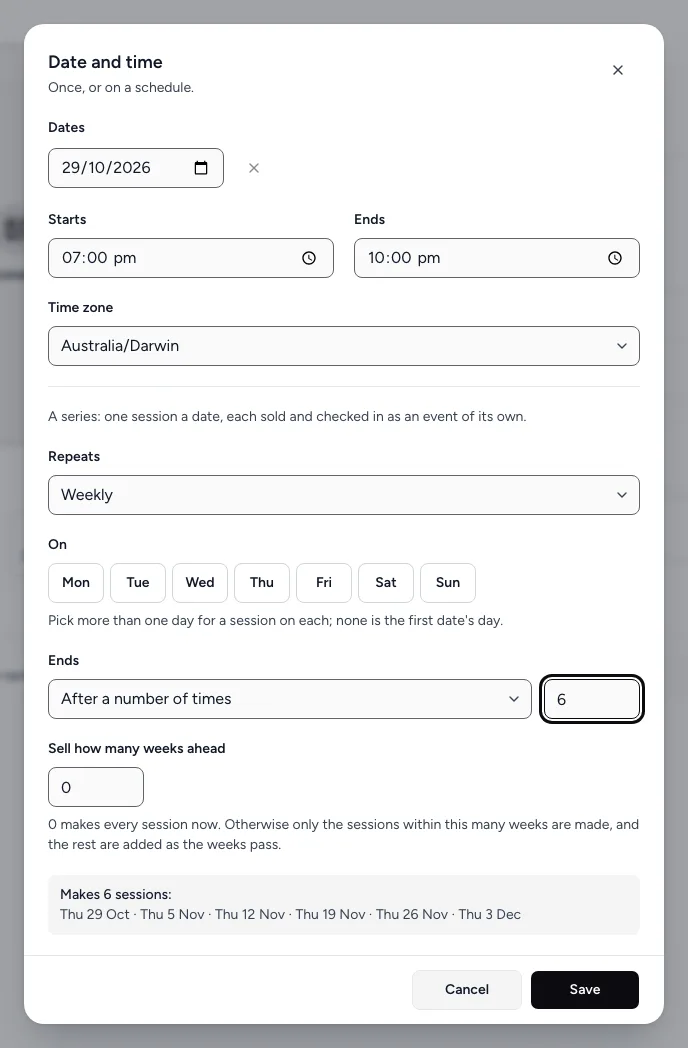
- Choose Pick a date. Set the first date and the times.
- Under Repeats, choose Daily, Every weekday (Mon–Fri), Weekly, Fortnightly or Monthly (same week and day).
- For weekly and fortnightly, choose the days under On. Pick more than one day for a session on each.
- Under Ends, choose After a number of times (and how many Times), On a date, or Never.
- Set Sell how many weeks ahead. 0 makes every session now. Otherwise only the sessions within that many weeks are made, and the rest are added as the weeks pass.
- Check the list of dates under "Makes N sessions", then choose Save.
- Choose Publish (or Save draft).
The series page
Open any session in the editor and choose Part of the series at the top, or choose Schedule sessions on its event page. The series page lists every session with its status and orders. From there you can:
- Publish series to put every draft session on sale at once.
- View public page to see the series as buyers do.
- Edit all sessions to change many at once. See Edit a series.
- Set up subscriptions. See Subscriptions for a series.
Changing one session
Each session is an event of its own: open it from Events to change just that date, its tickets or its capacity. Archiving or deleting a session leaves the rest of the series as it is.
Still stuck? Contact support and a person will get back to you.