Waitlist
When a ticket type sells out, people join a waitlist and are offered places that free up.
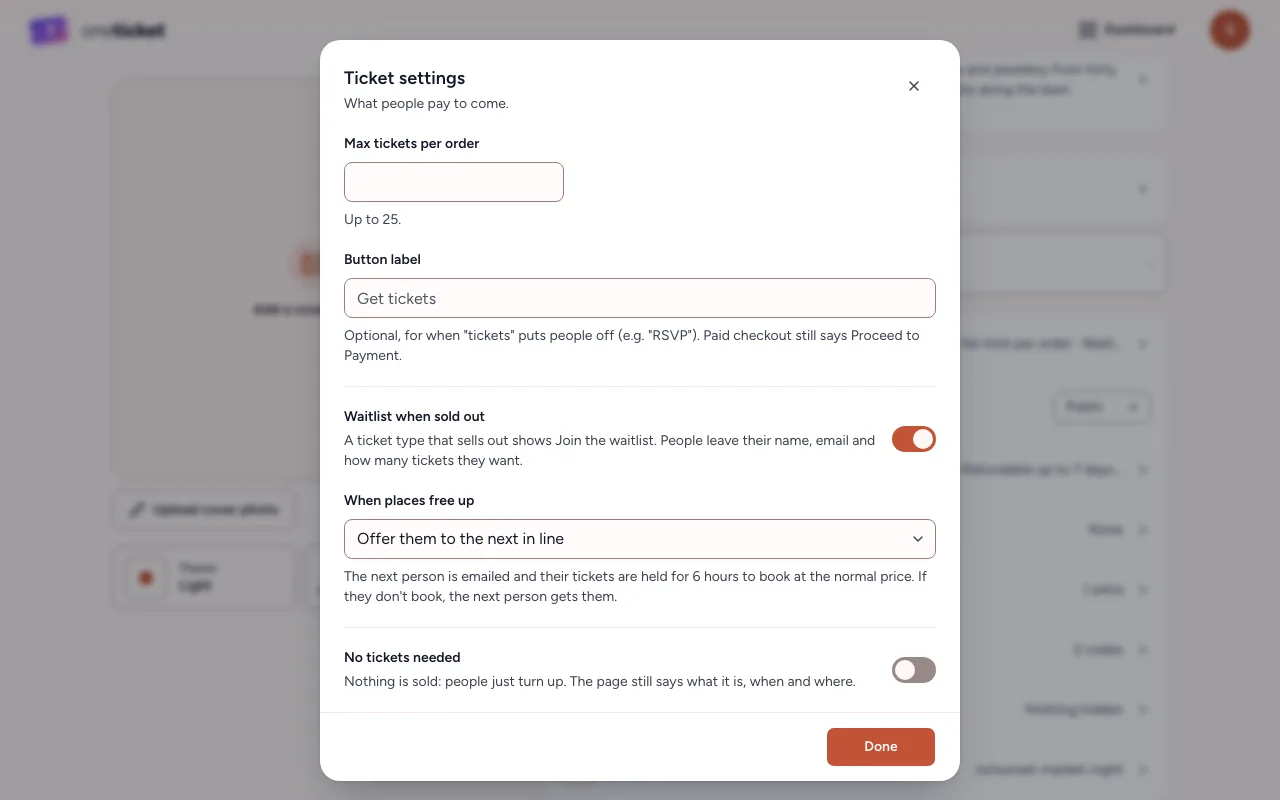
With the waitlist on, a ticket type that sells out shows Join waitlist. People leave their name, email and how many tickets they want.
Turn it on
- In the editor, choose 8 settings, then Ticket settings.
- Switch on Waitlist when sold out.
- Under When places free up, choose:
- Offer them to the next in line: the next person is emailed and their tickets are held for 6 hours, to book at the normal price. If they don't book, the next person gets them.
- I'll offer them myself: nobody is emailed until you choose Offer now.
- Choose Done, then Save.
See and manage the waitlist
- On Events, choose the event and open the Waitlist tab.
- Everyone waiting is listed in the order they joined, with how many tickets they want and their status: Waiting, Offered, Booked, Expired, Removed or Left.
- Open someone's menu (⋮):
- Offer now: their tickets are held and they're emailed.
- Remove from waitlist: they lose their place and aren't emailed.
Export CSV downloads the list.
Places free up when, for example, tickets are refunded or a held offer runs out. What buyers see is in Waitlist offers.
If you cancel the event, everyone still waiting is emailed that it's cancelled and taken off the list.
Still stuck? Contact support and a person will get back to you.