Tickets and prices
Ticket types, prices, capacity, price changes, sales windows, secret tickets and tickets for a group.
Each kind of ticket is a ticket type: General admission, Early bird, Family pass and so on. Each has its own price, capacity and sales window.
Add or change a ticket type
- In the editor, choose Tickets.
- Choose a ticket type to open it, or Add a ticket type for a new one.
- Fill in:
- Ticket name, such as "General admission".
- Price. Use 0 for a free ticket.
- Capacity: how many people it admits. Leave it empty for unlimited.
- Max per buyer: the most one email address can buy. Leave it empty for no limit.
- Choose Done, then Save in the editor.
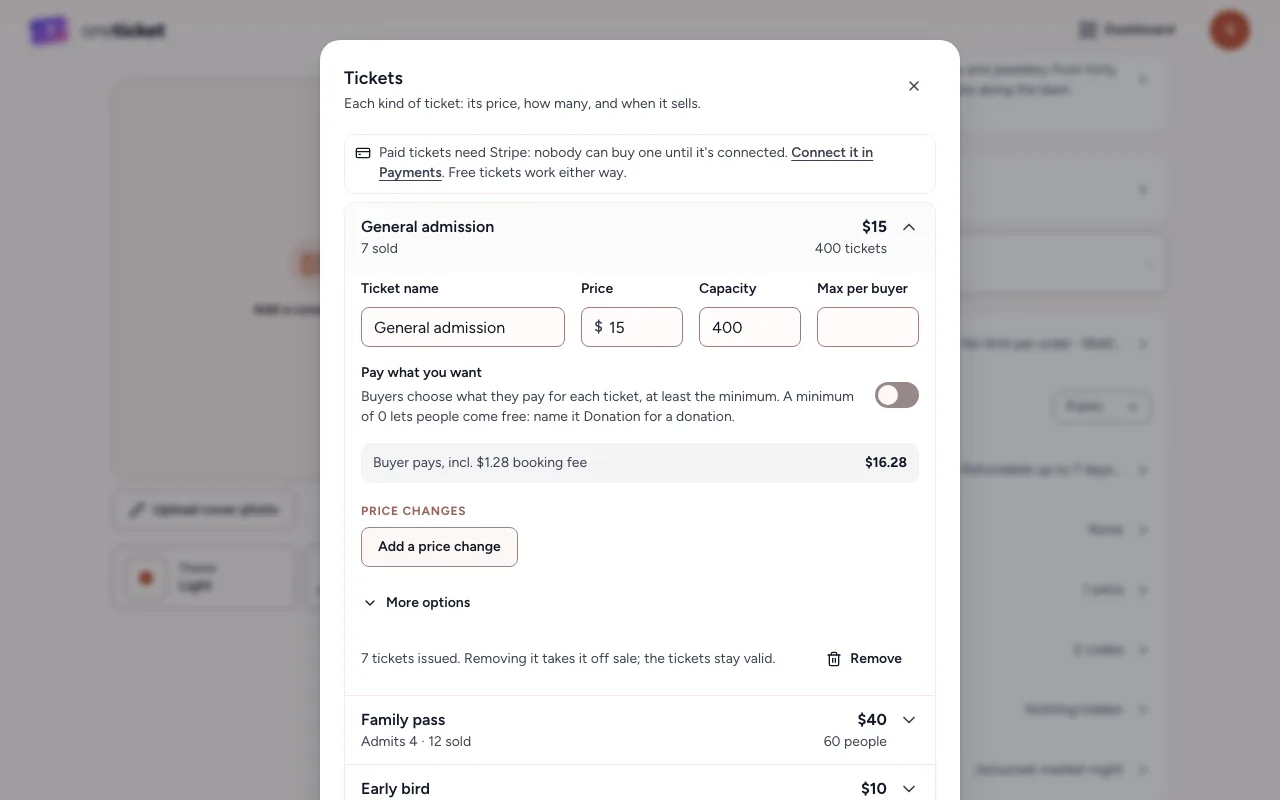
Under the price, the panel shows what the buyer pays with the booking fee, for example "Buyer pays, incl. $1.28 booking fee". You receive the full ticket price. See Fees.
Price changes (early bird pricing)
A ticket type can change price on its own:
- Open the ticket type and choose Add a price change.
- Type the New price.
- Choose When does it start?: On a date, So many days before the event, or Once so many tickets are sold.
- Choose Add.
The event page shows the current price and "Then $X" for the next one.
More options
Open a ticket type and choose More options for:
- Sales start and Sales end: in the event's time zone. Leave them blank to sell from when the page is live until the event.
- Hidden until sales start: otherwise the ticket shows, marked not on sale yet.
- Secret ticket: only people with the Access code see it. Share the code with the people it's for; capitals and spaces don't matter. Leave the code empty and it's a door-only ticket: sold at the box office, never on the event page.
- People per ticket: one price for a group, such as a table of 8 or a family of 4. Each person gets their own ticket and QR code and counts against the capacity. It's fixed once the ticket type has sold.
Capacity counts people
Capacity is the number of people a ticket type admits, so a Family pass of 4 uses 4 places. To cap the whole event, set each ticket type's capacity, or use Max tickets per order under Ticket settings to limit each order (up to 25).
Removing a ticket type
Open it and choose Remove. If tickets have been sold, it's taken off sale rather than deleted, and the tickets already sold stay valid.
No tickets needed
For a "just turn up" event, open Ticket settings and switch on No tickets needed. Nothing is sold; the page still says what it is, when and where.
Still stuck? Contact support and a person will get back to you.