Refund an order
Give the money back: the whole order, some tickets or extras, or an amount.
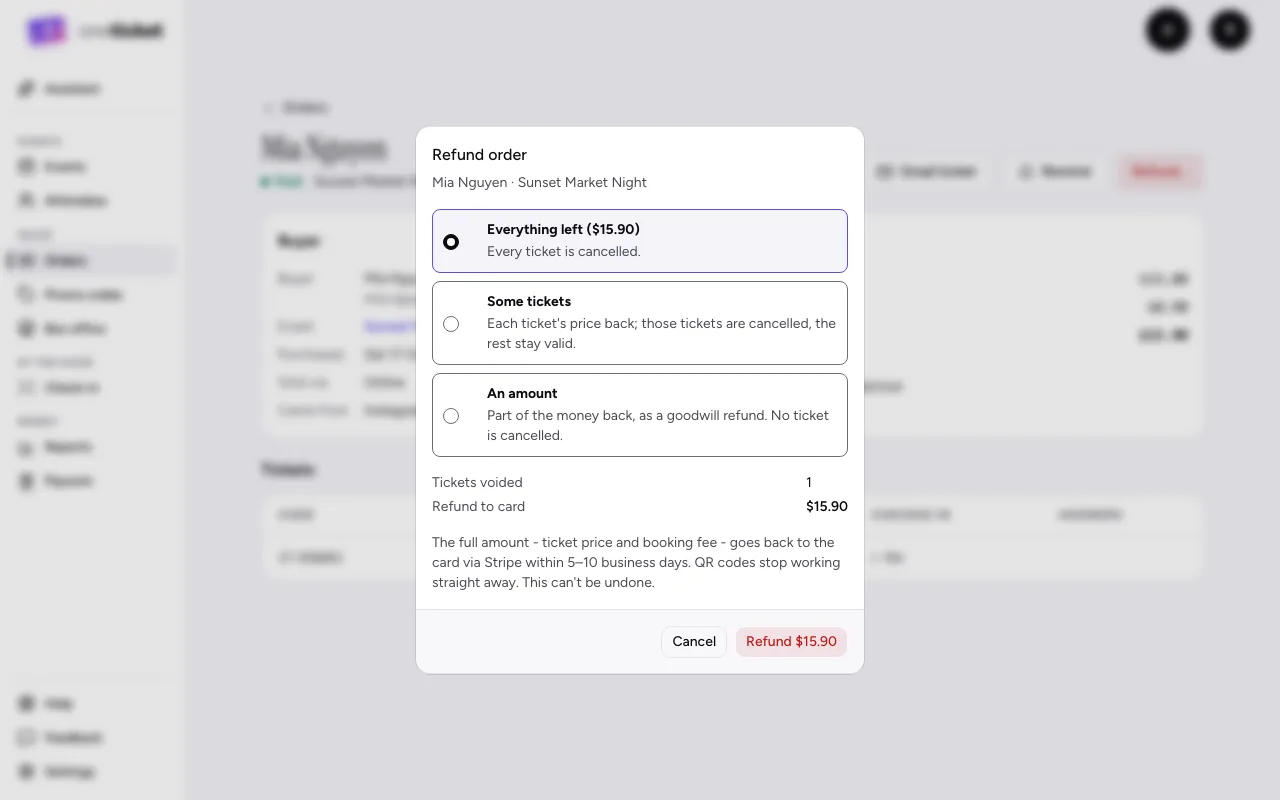
Refunds go back to the buyer's card through Stripe, usually within 5 to 10 business days. Refunded tickets' QR codes stop working straight away.
Refund a whole order
- Open the order (from Orders), or open its menu (⋮) on the list.
- Choose Refund order (in the menu, Refund).
- Check the amount: the full amount, ticket price and booking fee, goes back to the card.
- Choose Refund $X to confirm. This can't be undone.
For an order that wasn't paid online (a free booking, or cash at the door), no money moves: the tickets are cancelled. The button says Cancel tickets.
Refund part of an order
- Open the order and choose Refund….
- Under What to refund, choose:
- Everything left: every ticket is cancelled.
- Some tickets (or Some tickets and extras): tick the tickets, and choose how many of each extra. Each one's price comes back; those tickets are cancelled and the rest stay valid.
- An amount: part of the money back, as a goodwill refund. No ticket is cancelled. Type the Amount to refund.
- Choose whether to Include the booking fee. Untick it to refund the price only. Once an order's first refund keeps or gives back the fee, later refunds on it do the same.
- Optionally add a Note. It goes in the buyer's email and the order's history.
- Choose Refund to confirm.
The order's page lists every refund under Refunds, and its status becomes Partly refunded or Refunded.
Refunding a cancelled event
If you cancel an event, refund every order, ticket price and booking fee. Then archive the event.
Still stuck? Contact support and a person will get back to you.