Tracked links
A named link for each promoter, rep or post, with its visits and sales.
A tracked link is your event's link with a name attached, such as "Riley" or "Instagram bio". Each one counts its visits, orders, tickets and sales, so you can see who sells the most.
Make a link
- On Events, choose the event to open its page in the app.
- Choose the Links tab.
- Choose New link.
- Give it a Name after who or where you'll share it. Only you and your team see the name.
- Choose Make link, then Copy to copy it.
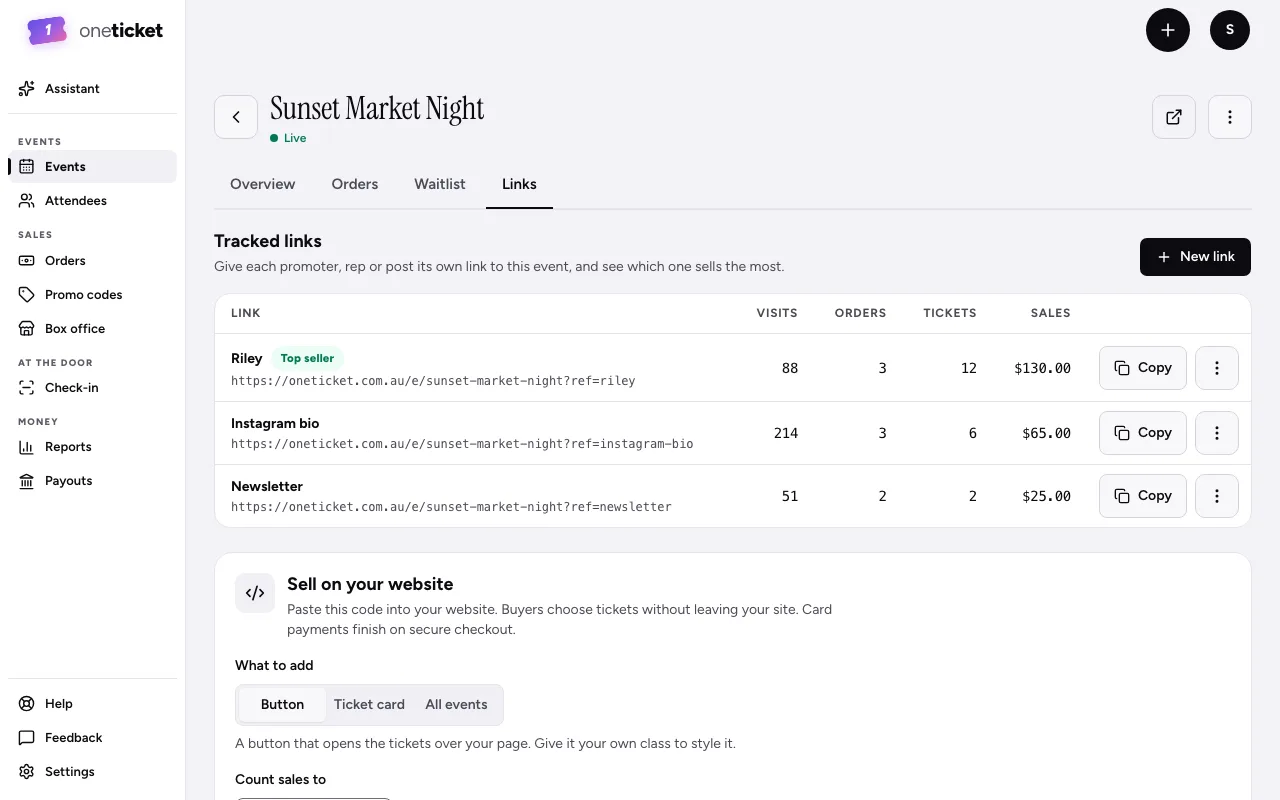
See what each link brings
The table shows each link's Visits, Orders, Tickets and Sales. The best one is marked Top seller. Each order brought by a link shows it under Came from.
Rename or delete
Open a link's menu (⋮):
- Rename: its address stays the same, so links already shared keep counting.
- Delete: the link stops counting. Orders it brought keep its name.
On Free
Making and renaming tracked links is on Pro and Team. On Free, the Links tab says so, with See plans, and has no New link.
Links you made on Pro or Team keep working: they still count visits and sales, and you can still Copy or Delete them. Only Rename goes.
Still stuck? Contact support and a person will get back to you.