Notifications and preferences
Choose which emails you and your buyers get.
Go to Settings, then Preferences.
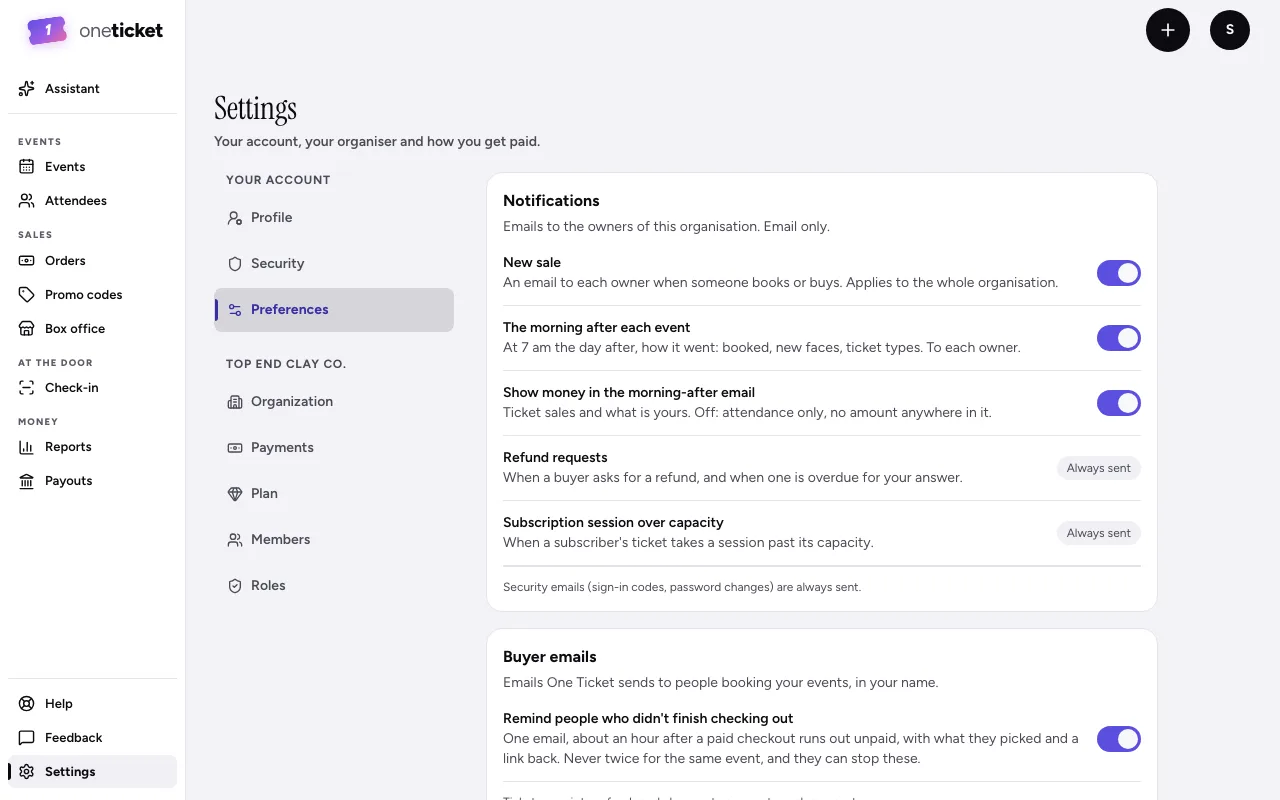
Notifications (to your organiser's owners)
- New sale: an email to each owner when someone books or buys.
- Subscriber payment failed: an email to each owner when a subscriber's card is declined. You get it once for that failed payment, however often Stripe tries the card again. It's on to begin with. It says who, which series, the plan and amount; new tickets wait until a payment goes through, and you don't need to do anything.
- The morning after each event: how it went, at 7 am the next day (Pro and Team). See The morning-after summary.
- Show money in the morning-after email (Pro and Team): switch off for attendance only.
- Refund requests and Subscription session over capacity: always sent.
Security emails, such as sign-in codes and password changes, are always sent. So is the email telling owners that their own Pro or Team plan payment didn't go through: see Your plan.
Buyer emails (sent in your name)
- Remind people who didn't finish checking out (Pro and Team). See Checkout reminders.
Tickets, receipts, refunds and changes to an event are always sent.
Only an owner or admin can change these.
Still stuck? Contact support and a person will get back to you.