Your refund policy
Choose what buyers can do themselves, and add your own written policy.
Each event has a refund policy. Buyers see it before they pay, and it decides what they can do from their ticket without emailing you.
Choose a policy
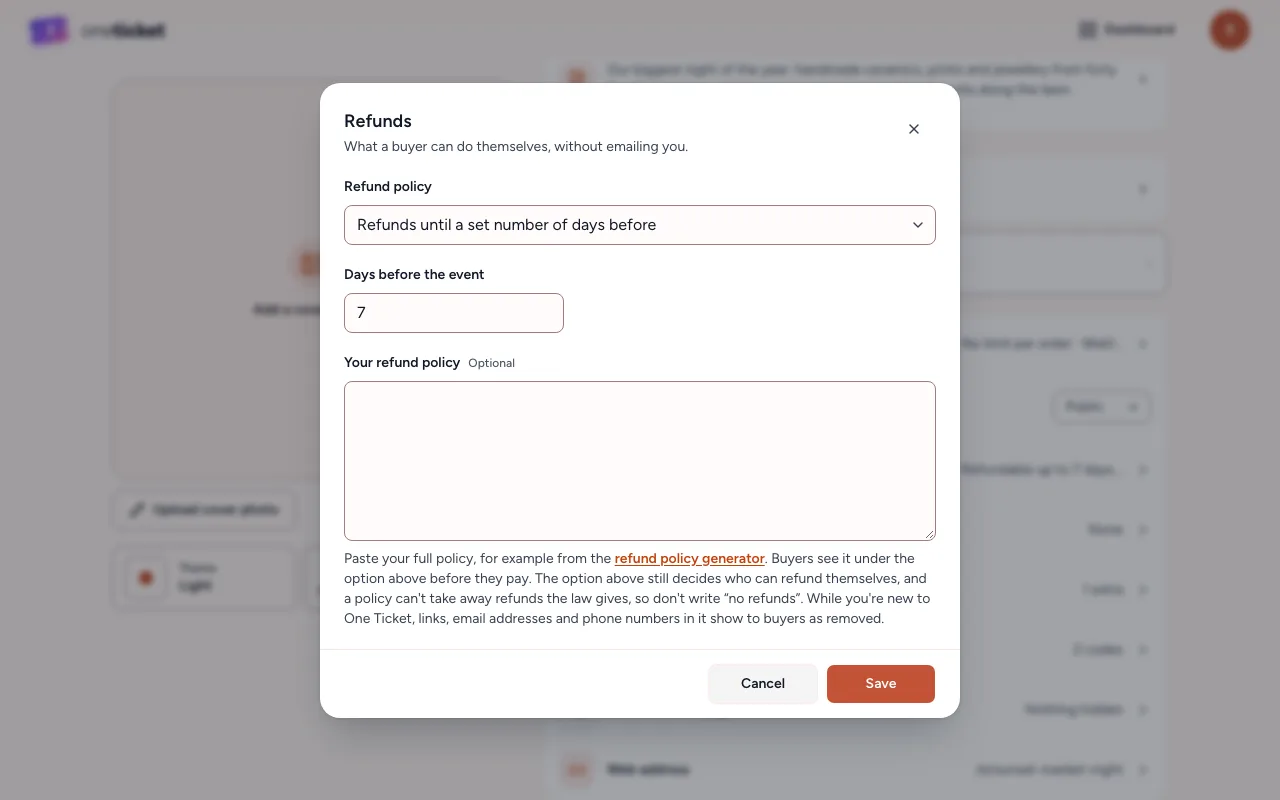
- In the editor, choose 8 settings, then Refunds.
- Choose a Refund policy:
- No change-of-mind refunds: buyers can't refund themselves.
- Refunds until a set number of days before: type the Days before the event. Until then, buyers can refund themselves from their ticket.
- Refunds any time before the event: buyers can refund themselves until it starts.
- Case by case: buyers ask from their ticket and you decide. See Refund requests.
- Optionally paste your full written policy under Your refund policy, for example from the refund policy generator. Buyers see it under the option you chose.
- Choose Save, then Save in the editor.
What the law says
A policy can't take away refunds the law gives, so don't write "no refunds". Say "no change-of-mind refunds" instead. If you cancel an event, refund your buyers from Orders.
Good to know
- When a buyer refunds themselves under your policy, they get back the ticket price. If you change the date, time or place after they booked, they can refund in full, booking fee included, until it starts.
- Only owners and admins can change the refund policy.
- While you're new to One Ticket, links, email addresses and phone numbers in your written policy show to buyers as removed.
Still stuck? Contact support and a person will get back to you.