Term passes
Sell a term up front: one payment for set dates, a ticket to every session in them, ending by itself. Set it up, refund it, and what buyers see.
A term pass is one payment for set dates, such as Term 1 2027. It's a ticket to every session of the series in those dates, including sessions you add later, made for the holder before each one. It never charges again: it ends by itself after its last day.
Term passes are sold from their own card on the series page, under the sessions: beside your weekly or monthly plans, or instead of them.
Sell a term pass
- Open the series page. Under the sessions, choose Sell a term pass.
- Fill in:
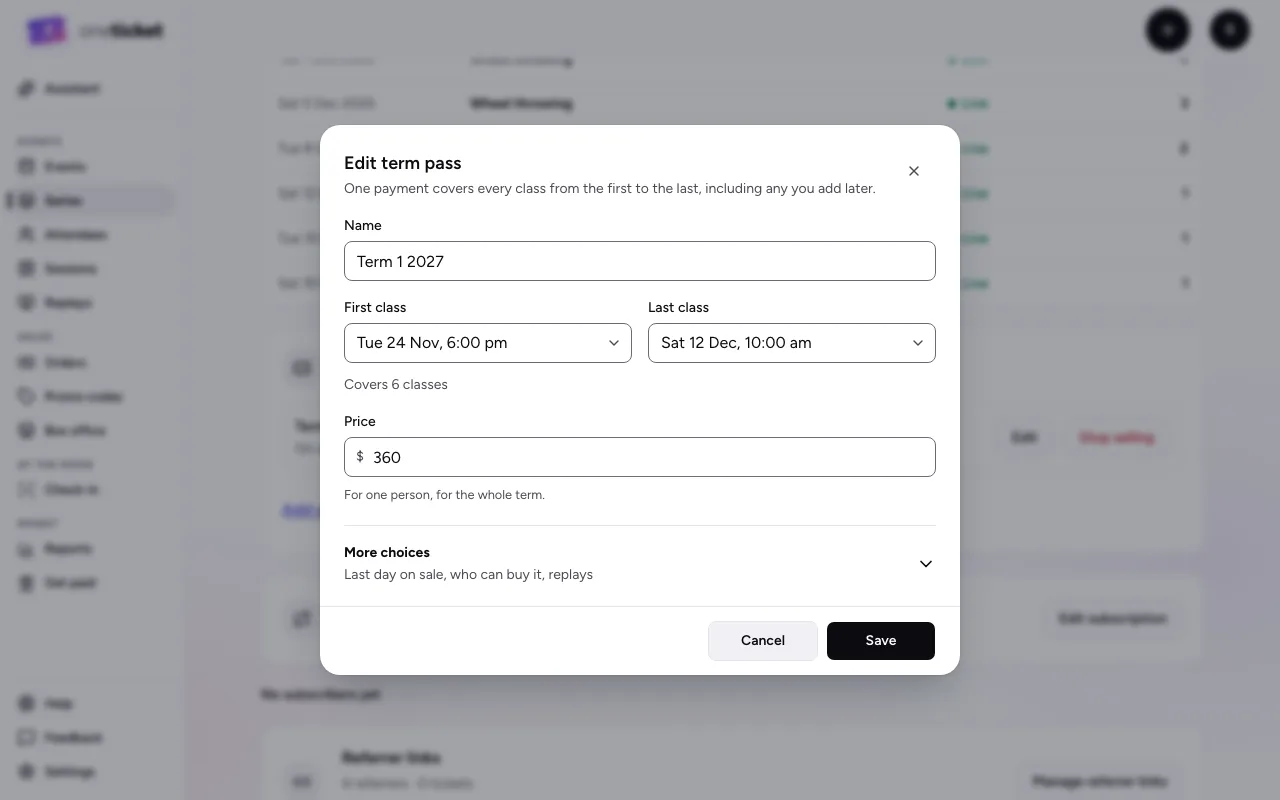
- Name: what buyers choose, such as Term 1 2027.
- First class and Last class: pick them from the series' own classes. It says how many classes the pass covers.
- Price: for one person, for the whole term. Free (0), or at least $0.50.
- Optionally open More choices for Online price (when the series has online sessions; blank: the same), Last day on sale (blank: it sells until the last class), Who can buy it (each choice's Name and People: a couple is 2 and pays twice; your weekly or monthly plans use these choices too) and Replays.
- Choose Save and sell. On a draft series, it goes on sale when you publish the series.
- To sell next term's too, choose Add another term (up to 8 at once). Change one with Edit, or stop it with Stop selling: people who already bought it keep their pass.
A series can sell term passes only, with no billing options. Without a name of your own, it's then called a term pass on its pages: "Get a term pass".
The series page's Term pass card lists each pass on sale with its dates, weeks and price, such as "Term 1 2027 · 3 Feb – 7 Apr · 10 weeks · $360.00". Paid term passes need Stripe connected, as paid plans do.
What buyers see
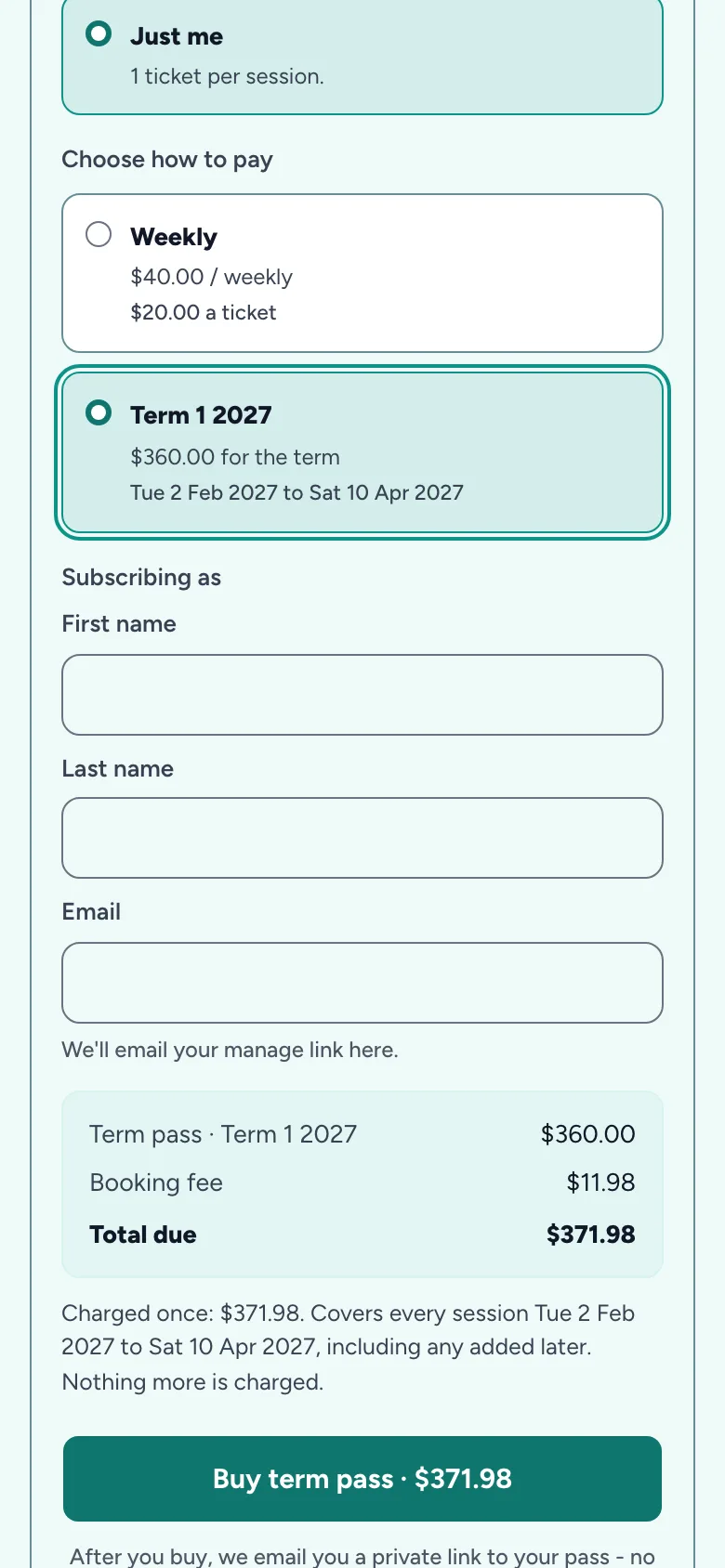
On the series page, the subscribe banner shows the term's price ("$360.00 a term + booking fee", just "$360.00 a term" where prices are shown with the fee in (US dollars), or "or $360.00 a term" beside a plan). On the subscribe page:
- Under Who is this for?, they choose who it covers.
- Under Choose how to pay, term passes come after any plans, each with its price for the term and its dates.
- Picked, the summary says "Charged once" with the total, and that it covers every session in its dates, including any added later, and that nothing more is charged.
- They choose Buy term pass and pay once on Stripe's secure checkout (or Get term pass when it's free).
They're emailed a private link to their pass ("You're in for Term 1 2027"). See Manage a subscription for what holders see.
How a term pass works
- Every session in its dates: each session in the term, from every schedule, gets the holder a ticket, emailed before it starts. Sessions you add to the term later are included while places last; if one is full when the pass reaches it, the holder is emailed that there's no ticket for that one.
- Room at every session: buying a pass holds places at every session of the term already on. If one of them hasn't room for the seats, the pass isn't sold: the buyer is told which day is full. If a session fills while their payment goes through, the pass doesn't start and they're refunded in full.
- When sales close: at the end of its Last day on sale (or its last class), and once the last session in the term has started, so nobody buys a pass with nothing left in it. A term whose sessions aren't made yet stays on sale until its first day.
- One at a time: a buyer can hold one plan, or term passes whose dates don't overlap (Term 1 and Term 2, say), never both. Someone who already holds a plan, or a pass for any of the same days, is told they're already subscribed and emailed the link to the one they have.
- No pause, skip or cancel: a term pass has none. Skip a week leaves term passes out: they paid once, so there's nothing to skip.
- It ends by itself: after its last day it ends, and nothing more is charged. About a week before, the holder is emailed that it ends soon (not if they bought it that week), with a link to the next term when one is on sale.
Your term pass holders
They're on the Subscriptions tab of Orders with your subscribers: their plan says "Term pass · Term 1 2027 ·" and its dates, and their billing says "Until" its last day. Their menu (⋮) has View details, Copy email, Edit name or email, Email next ticket, Refund term pass, End term pass (it ends now and nothing is refunded) and Delete. See Subscribers.
Refund a term pass
Only you can refund a term pass: holders can't cancel it themselves. Anyone on your team who can refund orders can do it.
- Choose Orders, then the Subscriptions tab.
- Open the holder's menu (⋮) and choose Refund term pass. It says how much is left to refund.
- Under How much, choose:
- Refund all (with the amount): the pass ends now and its tickets to sessions still to come stop working (and any replays added with it).
- Refund part, and type the Amount to refund: the pass carries on, with its tickets.
- Choose Refund.
The holder is emailed. The money comes back from your Stripe balance, and the booking fee in proportion. You can refund part more than once, until nothing is left.
Replays with a term pass
Each term pass can leave replays out, include them, or offer them as an extra for a price a person for the term, with an optional limit on how many people: see Replays.
Still stuck? Contact support and a person will get back to you.